How We Build Production AI Workflows
A workflow-first approach to building AI systems that combine data, software, LLMs, validation, and human review.

Ganesh Voona
Co-Founder9 min read
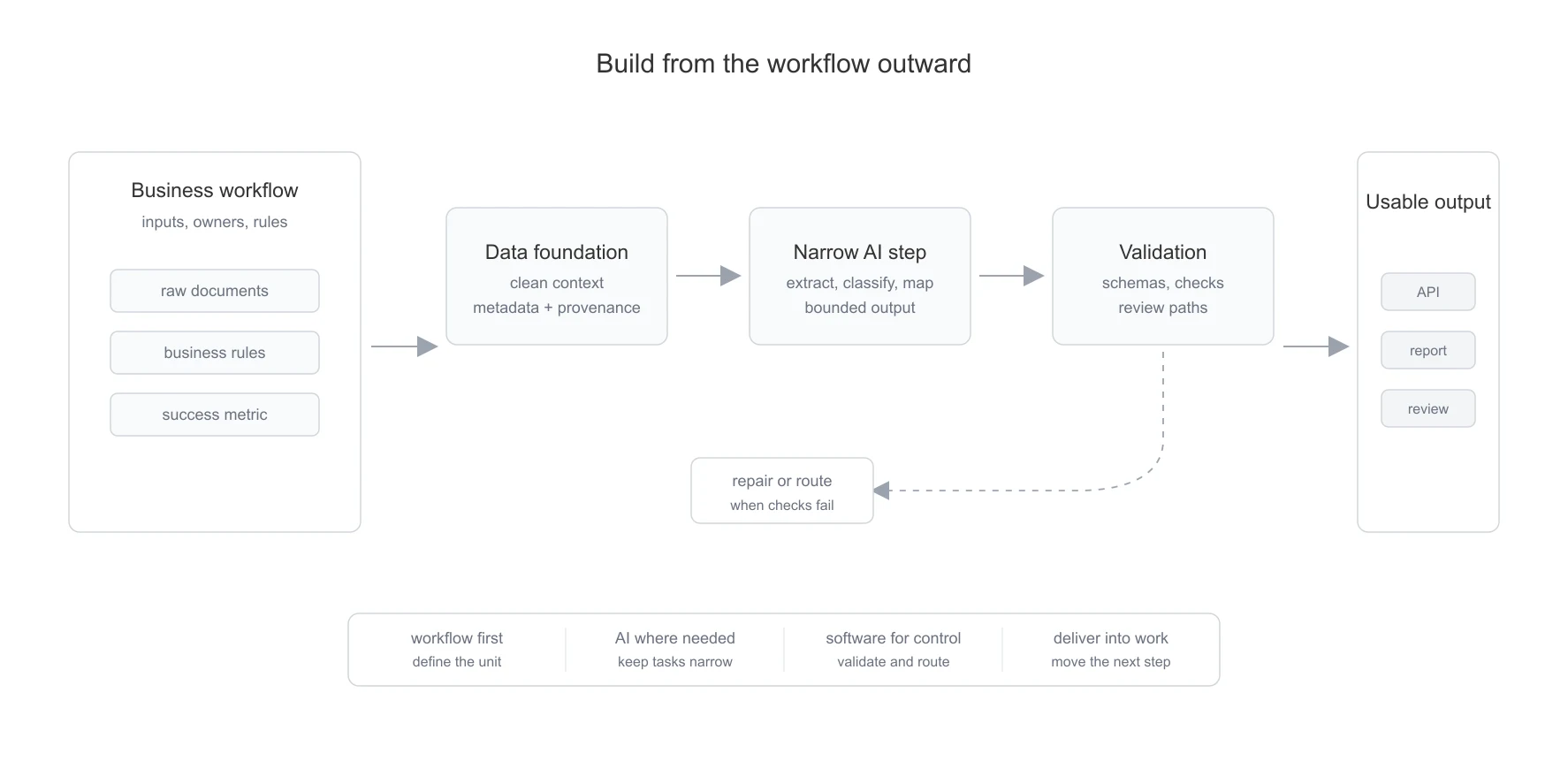
AI workflow automation sounds simple from the outside. Take a repeated task, add an LLM, and reduce manual work. In practice, this is rarely enough. A model can read, extract, summarize, classify, and generate, but a business workflow is not just a model call. It has inputs, owners, rules, exceptions, approvals, downstream systems, and a definition of what "done" means.
This is the part that usually decides whether an AI system works in production.
At stockinsights.ai, we started with a problem that looked like information access. Public company data was scattered across many different types of filings and disclosures. Research teams needed to search across this material, but they also needed to turn it into repeatable outputs.
The first layer was search and assistance. The deeper problem was workflow automation. Research teams do not only ask questions. They extract KPIs, compare commentary across quarters, monitor portfolios, prepare notes, and push outputs into internal systems. Each of these is a workflow, with its own input, output, validation path, and failure mode.
That changed how we thought about the product. The useful question was no longer "What can the model answer?" The useful question became "Which part of this repeated workflow can AI reduce?"
At a Glance
| Design choice | Why it matters |
|---|---|
| Start with the workflow | The system needs a real input, output, owner, and success metric |
| Define the unit of work | You can only automate what you can measure and repeat |
| Build the data foundation first | Messy inputs make even strong models unreliable |
| Keep AI steps narrow | Smaller model tasks are easier to test, debug, and improve |
| Use deterministic controls | Rules, validation, retries, and state should not live only in prompts |
| Add review paths early | Uncertainty should become a flag, not a silent bad output |
| Deliver into the workflow | The output should move work forward, not just look impressive |
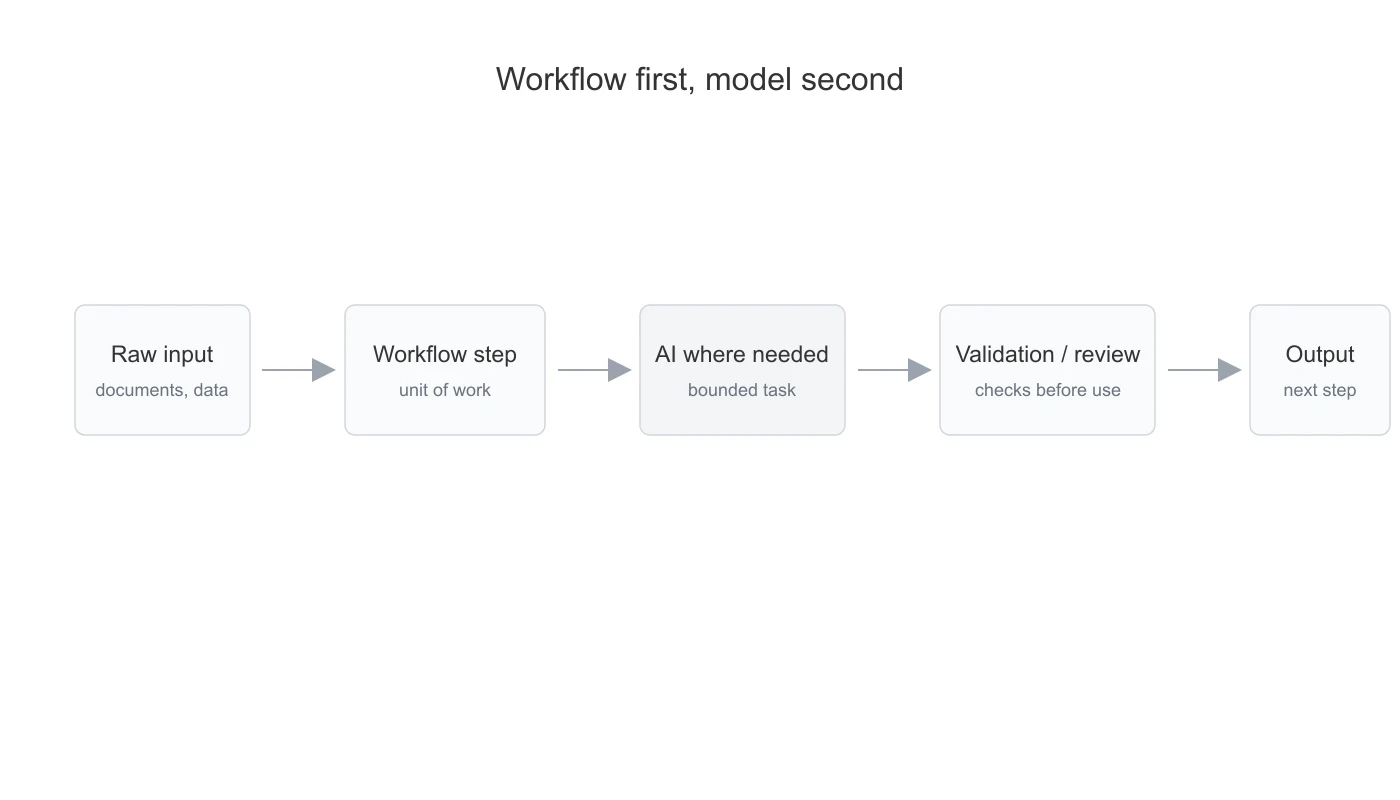
1. Why the Simple AI Approach Fails
The simple approach is to take a process and ask an LLM to do it end to end. That can work for a demo, but it usually fails in production.
Most business workflows have many hidden steps. If all of this is pushed into one large model call, the system burns tokens on repetitive work, gives you less control over intermediate decisions, and becomes harder to trust. The model may return a clean-looking answer, but it may have used the wrong source, skipped a rule, missed an exception, or produced an output that cannot be used downstream.
Production AI systems need to make failure visible. A bad output should become a flag, not an unnoticed step in the workflow.
2. The Two Problems Hidden Inside "Automate This Workflow"
When someone says "automate this workflow," there are usually two different problems inside it. The first is the business problem: what is the current process, what is slow or expensive, what should improve, who owns the output, and what happens when the system is unsure?
The second is the systems problem: what data is available, whether it is clean enough, which steps need AI, which steps need deterministic code, where validation happens, and where the final output goes. These two problems are connected, but they need different thinking.
3. The Production Architecture
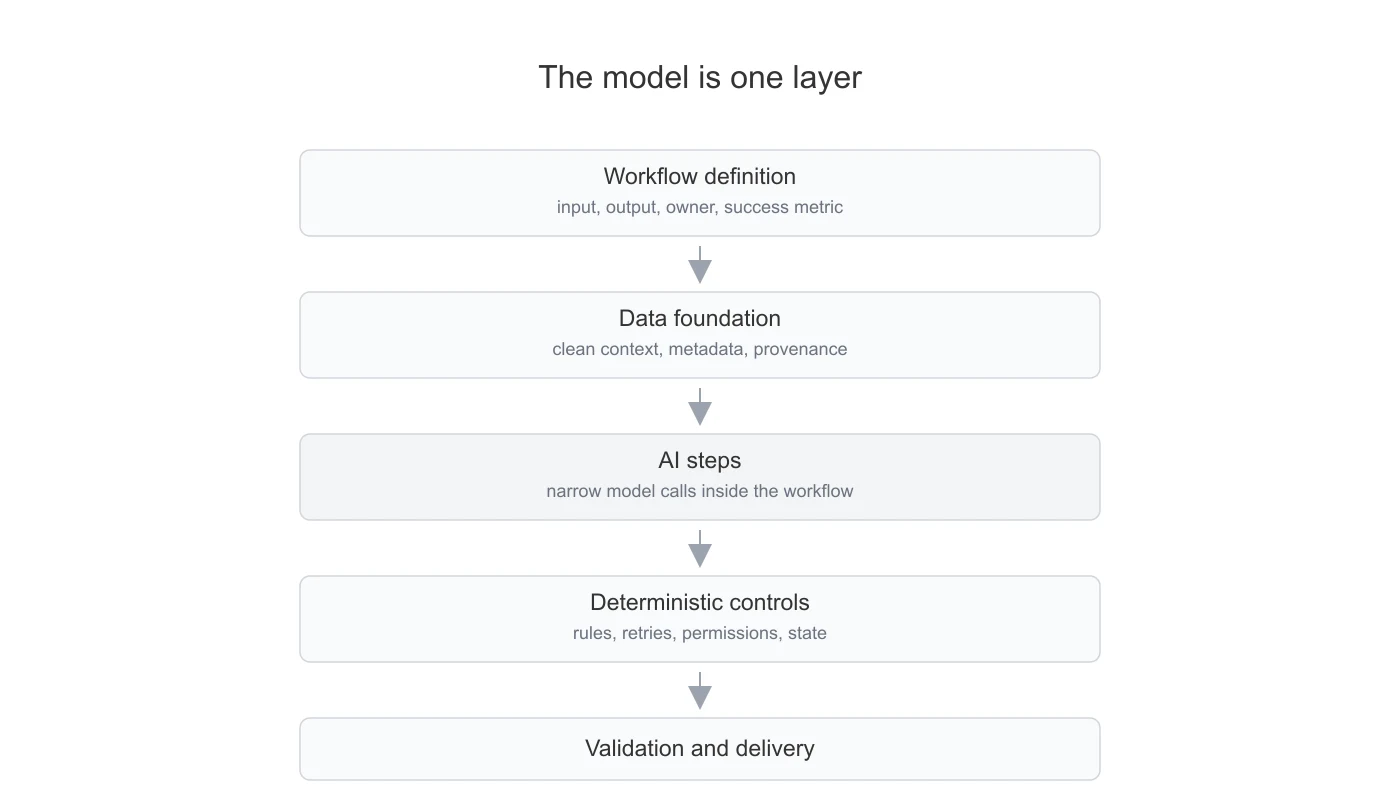
The model is not the workflow. The model is one component inside a workflow. A production AI workflow usually has five layers:
- workflow definition
- data foundation
- AI steps
- deterministic controls
- validation and delivery
If the workflow is unclear, the system will optimize for the wrong output. If the data foundation is weak, the model will reason over bad inputs. If the AI step is too broad, it becomes hard to test. If deterministic controls are missing, errors become silent. So we try to build from the workflow outward.
4. Building Reliable AI Workflows
The workflow becomes reliable only after the responsibilities are split correctly. AI is useful, but it should not be asked to own the entire process. The surrounding system has to decide what the model sees, what it is allowed to output, how the output is checked, and what happens when checks fail.
4.1 Start With a Real Unit of Work
The first design decision is to define the unit of work. It matters because it defines what needs to be measured. You cannot improve a workflow unless you know what one completed task looks like. You need to know the input, the output, the current manual effort, the expected turnaround time, and the failure path.
4.2 Build the Data Foundation Before the AI Layer
Most workflows depend on messy inputs. Input data formats may vary. Internal systems may use inconsistent identifiers. Important context may be spread across multiple systems.
If this layer is weak, the model has to compensate for bad inputs. That is usually a bad design. The data foundation should make the model's job narrower. It should collect the right sources, preserve structure where needed, attach metadata, map entities, remove duplicates, track versions, and store provenance.
Once the data layer handles these differences, the AI layer becomes much more reliable.
4.3 Keep the AI Step Narrow
A real workflow does not need one large prompt trying to do everything. It usually works better when the AI is given a narrow job inside a larger software workflow.
For example, the model may classify a document, identify the relevant section, extract fields, or map messy labels to a schema. But once the pattern is known, the repeated parts should move into code instead of asking the model to solve them again every time.
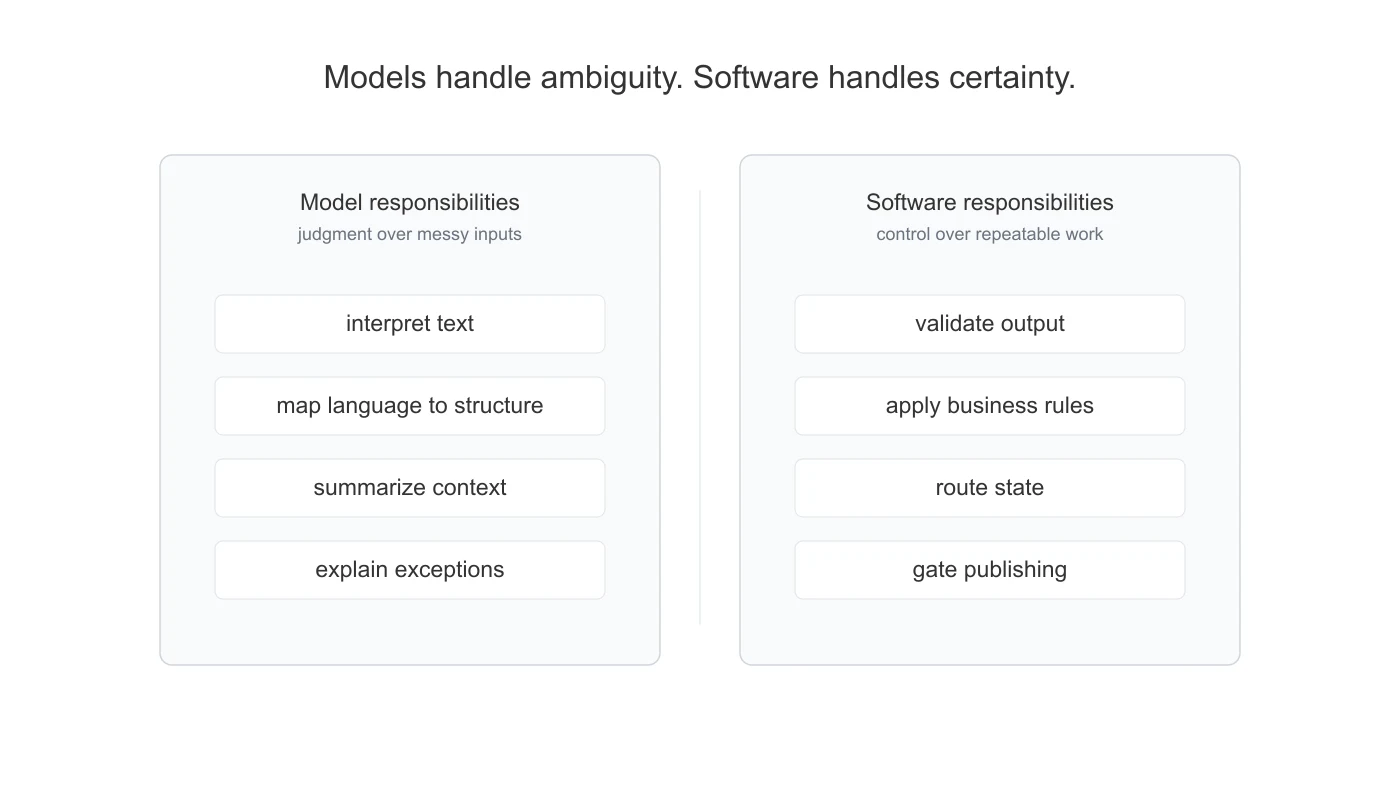
This makes the system easier to test and debug. The model handles ambiguity. The software handles the repeatable parts. That boundary is what makes the workflow reliable.
4.4 Make the Model Output Usable
A model response is not the same as a workflow output. The model may extract, classify, or summarize something, but the surrounding system still has to decide whether that output can be used.
Is the required information present? Is it in the expected format? Does it match the source? Is it good enough to move forward? If the answer is yes, the workflow continues. If not, the item should be repaired, retried, or sent for review.
This is the difference between a demo and a production workflow. A demo ends when the model responds. A workflow ends when the output is usable.
4.5 Add Validation Before Scaling
Validation should not be added at the end. It should be part of the first working version.
AI outputs can be wrong in quiet ways. A response may look clean even when it used the wrong source, missed a field, or misunderstood the context. The system should catch these failures before the output is trusted.
A missing source should become a flag. A mismatch should become an exception. A low-confidence output should go to review. The goal is not to make the system perfect on day one. The goal is to make uncertainty visible.
4.6 Deliver Into the Existing Workflow
The final output should move work forward. It may be structured data, an API response, a dashboard update, an Excel-ready file, a draft note, an alert, or a review queue.
The form matters less than the next step it enables. The value of AI is not in producing an impressive intermediate output. The value is in reducing the next manual step.
A workflow is useful when someone can trust the output enough to act on it, review it, or send it into the next system.
5. What We Deliberately Do Not Let the Model Do
A useful way to understand a production AI workflow is to look at what the model does not do.
We do not ask the model to own the entire process. We do not make it the source of truth for business rules. We do not ask it to validate itself just because it sounds confident. We do not let it silently publish outputs when checks fail. We do not ask it to decide which actions are allowed without system controls around it.
Those jobs belong to the surrounding system. The model is used where it is genuinely useful: interpreting messy inputs, mapping language to structure, summarizing context, comparing text, generating drafts, and helping repair ambiguous cases.
The production boundary is important. Probabilistic judgment should sit inside deterministic workflow controls.
6. The Broader Lesson
The broader lesson is simple: production AI starts with workflow design, not model selection. A better model can improve a system, but it cannot fix an unclear workflow, poor data, missing validation, or undefined ownership.
The best starting point is usually a repeated, document-heavy workflow with clear inputs, clear outputs, and a measurable business outcome. It should be narrow enough to deliver, but real enough to matter.
The model should be given a bounded job. It should handle the ambiguity inside the workflow. The surrounding system should handle structure, validation, state, delivery, and failure handling.
That is how AI becomes useful in production. Not by replacing the workflow, but by becoming a reliable part of it.
Work With Us
We build stockinsights.ai for investment research in public markets.
We work with teams that want to automate document-heavy research, reporting, and operational workflows using AI, data pipelines, validation systems, and custom integrations.
If your team has a workflow where public company data, documents, or recurring research processes create manual work, reach out.
- For Data Feeds: API Documentation
- For Custom Workflows: Contact Us